How it Works
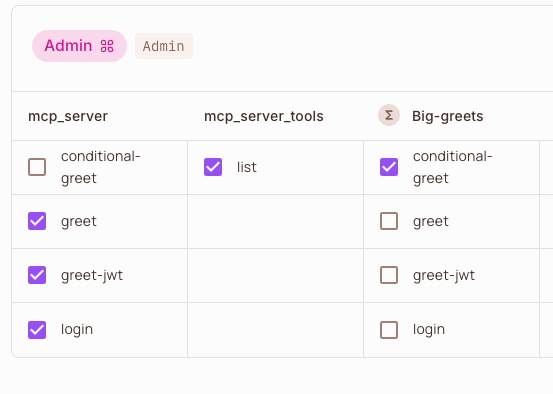
Leveraging FastMCP’s Middleware, the Permit.io middleware intercepts all MCP requests to your server and automatically maps MCP methods to authorization checks against your Permit.io policies; covering both server methods and tool execution.Policy Mapping
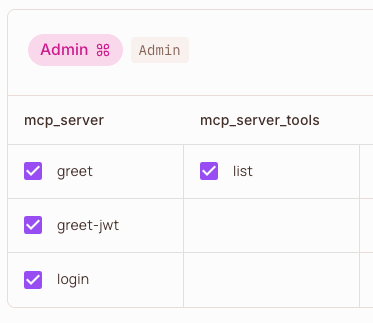
The middleware automatically maps MCP methods to Permit.io resources and actions:- MCP server methods (e.g.,
tools/list,resources/read):- Resource:
{server_name}_{component}(e.g.,myserver_tools) - Action: The method verb (e.g.,
list,read)
- Resource:
- Tool execution (method
tools/call):- Resource:
{server_name}(e.g.,myserver) - Action: The tool name (e.g.,
greet)
- Resource:
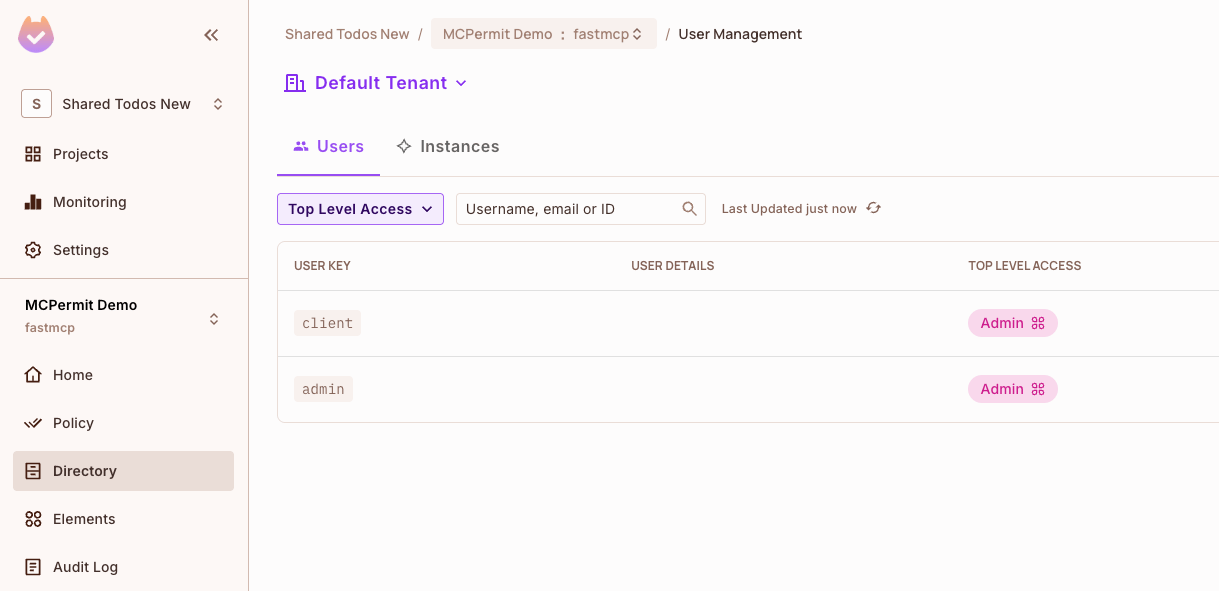
Note: Don’t forget to assign the relevant role (e.g., Admin, User) to the user authenticating to your MCP server (such as the user in the JWT) in the Permit.io Directory. Without the correct role assignment, users will not have access to the resources and actions you’ve configured in your policies.For detailed policy mapping examples and configuration, see Detailed Policy Mapping.Example: In Permit.io Directory, both ‘client’ and ‘admin’ users are assigned the ‘Admin’ role, granting them the permissions defined in your policy mapping.
Listing Operations
The middleware behaves as a filter for listing operations (tools/list, resources/list, prompts/list), hiding to the client components that are not authorized by the defined policies.
Execution Operations
The middleware behaves as an enforcement point for execution operations (tools/call, resources/read, prompts/get), blocking operations that are not authorized by the defined policies.
Add Authorization to Your Server
Permit.io is a cloud-native authorization service. You need a Permit.io account and a running Policy Decision Point (PDP) for the middleware to function. You can run the PDP locally with Docker or use Permit.io’s cloud PDP.
Prerequisites
- Permit.io Account: Sign up at permit.io
- PDP Setup: Run the Permit.io PDP locally or use the cloud PDP (RBAC only)
- API Key: Get your Permit.io API key from the dashboard
Run the Permit.io PDP
Run the PDP locally with Docker:https://cloudpdp.api.permit.io
Create a Server with Authorization
First, install thepermit-fastmcp package:
server.py
Configure Access Policies
Create your authorization policies in the Permit.io dashboard:- Create Resources: Define resources like
mcp_serverandmcp_server_tools - Define Actions: Add actions like
greet,add,list,read - Create Roles: Define roles like
Admin,User,Guest - Assign Permissions: Grant roles access to specific resources and actions
- Assign Users: Assign roles to users in the Permit.io Directory
Example Policy Configuration
Policies are defined in the Permit.io dashboard, but you can also use the Permit.io Terraform provider to define policies in code.Identity Management
The middleware supports multiple identity extraction modes:- Fixed Identity: Use a fixed identity for all requests
- Header-based: Extract identity from HTTP headers
- JWT-based: Extract and verify JWT tokens
- Source-based: Use the MCP context source field
JWT Authentication Example
ABAC Policies with Tool Arguments
The middleware supports Attribute-Based Access Control (ABAC) policies that can evaluate tool arguments as attributes. Tool arguments are automatically flattened as individual attributes (e.g.,arg_name, arg_number) for granular policy conditions.
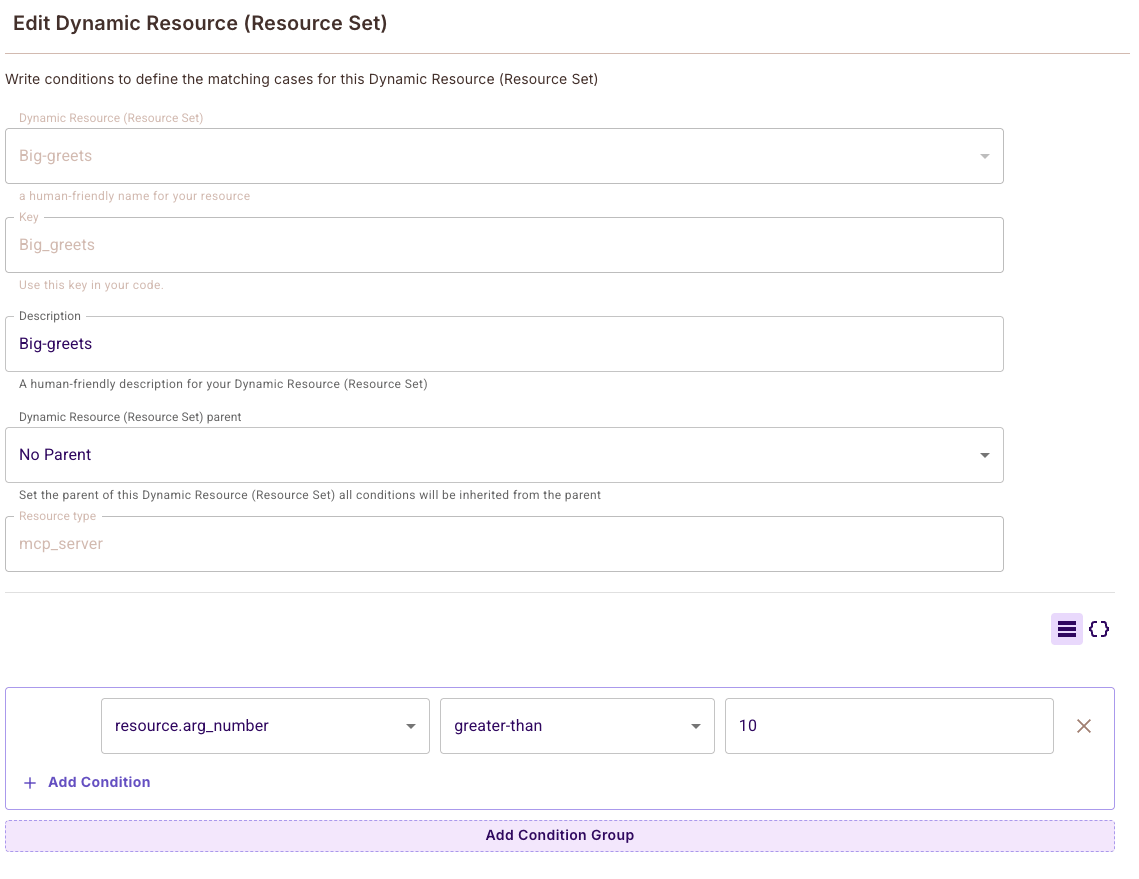
resource.arg_number greater-than 10 to allow the conditional-greet tool only when the number argument exceeds 10.
Example: Conditional Access
Create a dynamic resource with conditions likeresource.arg_number greater-than 10 to allow the conditional-greet tool only when the number argument exceeds 10.